The local AI that prepares your questions before the analyst starts.
You run a team, or the whole company. You are responsible for the numbers, but analysis is not your main job. You know that something in them deserves a closer look, but “can you look into it?” is not a brief, and every exchange with the data team or an outside analyst costs days. Take the first look yourself. Open your own exports in Totsum, ask in plain language, see what the data holds, and shortlist what deserves the real work.
You give your data team or analyst a follow-up report with your questions, the charts and the queries, built to be verified by the person you are briefing. Because your questions are ready, the real analysis starts days earlier.
Totsum requires a GPU with roughly 12 GB of VRAM, or a Mac with an M4 Pro chip or better (an M3 Max or M3 Ultra also qualifies) and at least 18 GB of unified memory. Please check compatibility before you apply.
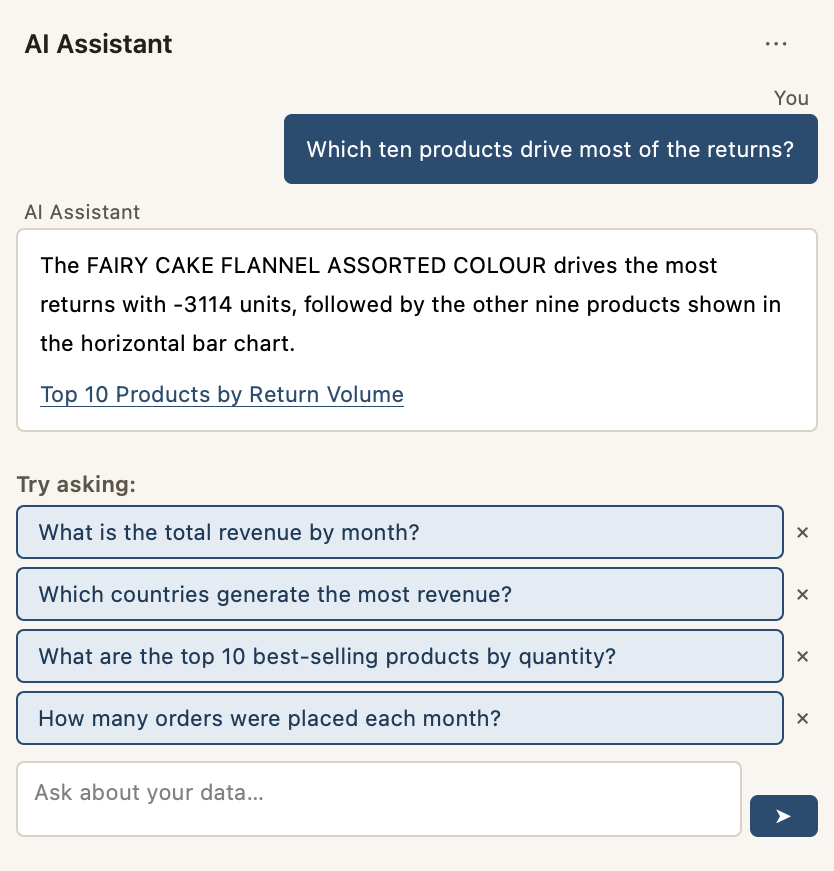
It explores your data
Totsum gives you a first look at a new file within minutes, so the analysis that comes next starts with the right questions.
See how ↓
The AI runs locally
The model and the SQL engine run on your own machine. Totsum can work on a computer with no network connection. It needs no account and sends no telemetry.
See how ↓
The AI helps, and you decide
The AI answers with previews. You shortlist the results that matter, and your reviewer, who is a person, records the verdict on each of them.
See how ↓
How it works
Ingest. Explore. Validate.
Totsum works as one loop. You add your files, you ask them questions, and the loop ends with a report that your reviewer checks.
Totsum opens CSV, multi-sheet Excel, nested JSON or Parquet files where they are, so you do not upload them or build an import pipeline first.
Ask in plain language and get a preview, then shortlist it or rule it out and ask the next question. A question can span several imported files. Totsum looks for the relevant tables and joins them.
Your shortlist becomes a follow-up report. Your qualified reviewer records Valid, Invalid or Inconclusive against each result, and you import the completed review into the app.
“Ingest” is the data world’s word for bringing a file into a tool. You drop a file in, and Totsum reads it into tables that you can question. The file itself stays where it is, unchanged.
It explores your data, question by question.
The first hours with a new file cost the most. You don’t know yet where to look, and with the usual tools every idea you want to test means building an export, a pivot table, a formula or a chart. In Totsum you ask a question, read the answer and ask the next one, so testing an idea takes minutes instead of an afternoon.
The kind of questions
- “Which ten products drive most of the returns?”
- “How did weekend sales compare to weekdays, month by month?”
- “Which country’s customers spent the most?”Even when the customers and the invoices live in two different files, Totsum looks for the relevant tables and joins them.
The kind of answers
With each answer you get a plain-language explanation, the chart, a preview of the rows behind it, and the query that produced them. When Totsum notices that it had to make an assumption in order to answer, such as which file, which column or which spelling to use, it says so with the answer, and you can correct it. You read the result, then you shortlist it or rule it out, and you ask the next question.
Except when it is too complex, the generated SQL is also translated into a query flow, which gives a step-by-step account in plain language of what was read, filtered, grouped and calculated.
The AI runs on your machine.
The files that need AI the most are the ones you can’t hand to a cloud AI, such as client data under NDA, personal data, or anything a contract says must stay in-house. With Totsum, the language model and the SQL engine run on your own computer, and Totsum opens your file where it already is. That is also why Totsum needs a powerful machine.
Demo
Watch it work with the connection off.
In the demo, the network is switched off on screen, and then Totsum gives a confidential file its first look. You see the answer, the chart and the rows behind it appear.
The rhythm
It works while you work.
An AI model that runs on your own machine needs time to work. Expect a few minutes for an answer rather than a few seconds, and Totsum is designed around that wait. With the usual tools, you stay at the keyboard for as long as the search takes. With Totsum, you ask the question, continue with your other work, and find the answer ready later, with the chart, the preview and the rows behind it. The demo above shows the wait.
Privacy
Your data is processed on your machine.
Totsum processes your datasets, questions, generated queries and results on your computer. Where the confidentiality of your work requires it, Totsum can work on a computer with no network connection.
- Local AI model. The language model runs in memory on your machine rather than on a cloud API.
- Local SQL engine. Every query runs in an embedded database engine on your computer.
- No account, no sync, no telemetry, no update check. There is nothing to sign up for, and your license is verified on your device.
- Can work on a computer with no network connection. The installer downloads the AI model once (~7 GB). On a machine with no internet access, the model files can be provisioned by hand instead, and the machine can stay disconnected.
The handoff
A report built for the human check.
AI is helpful, and that is what makes it risky. After a few good answers in a row from any AI, it is natural to relax and stop checking. Yet some answers will be wrong, and that is a certainty. When a number is wrong, the decision belongs to a person. This is why the report Totsum produces is a follow-up report and not a final one. It is addressed to the expert or the team who does the last check, and it carries what they need to check the work. It holds the question exactly as you asked it, the chart, a subset of the data behind it, the query flow and the generated SQL. It also has a verdict field for each result, and each verdict returns with your reviewer's name on it.
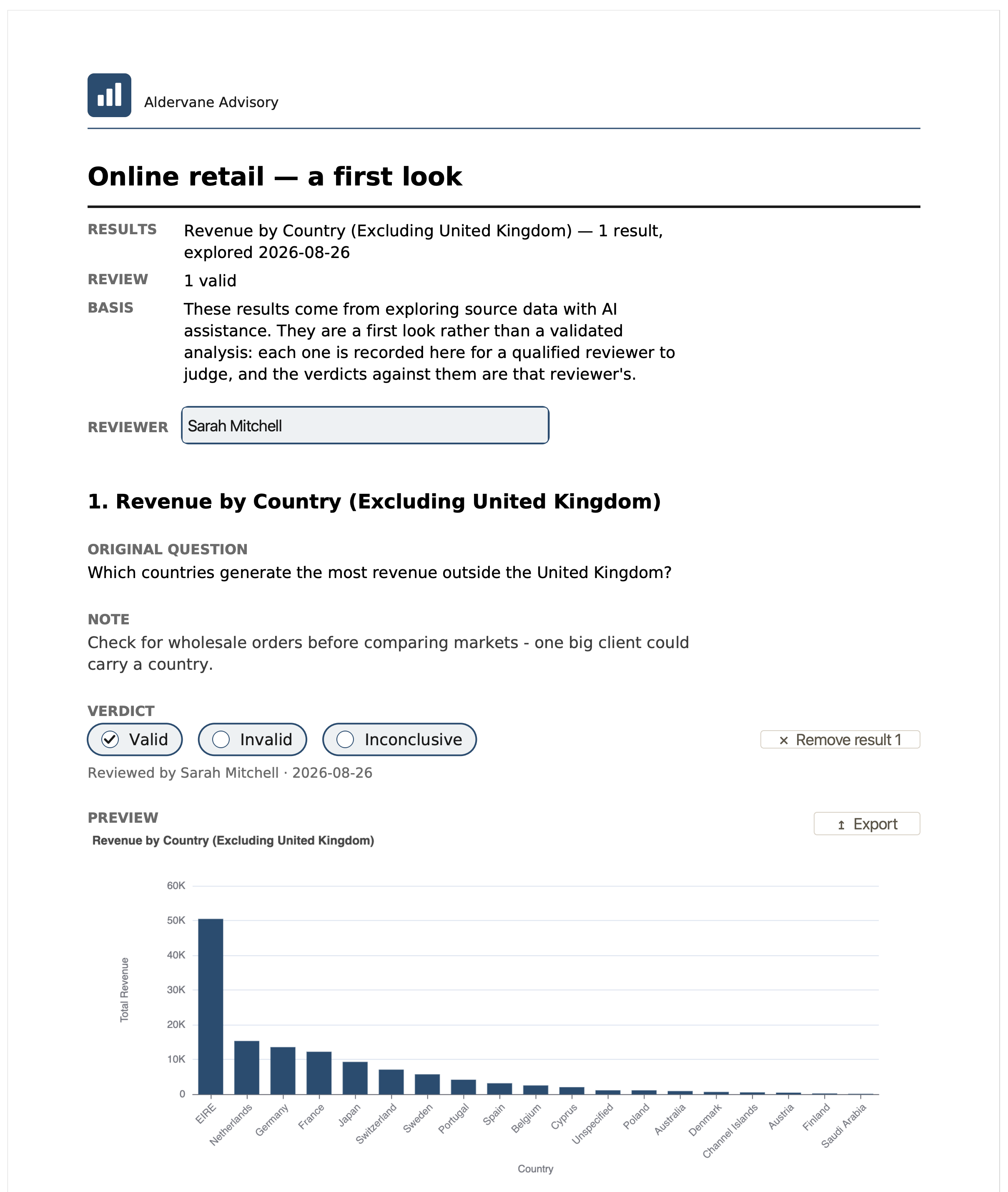
It says what it is
The report opens with a statement of what it is, in these words: “These results come from exploring source data with AI assistance. They are a first look rather than a validated analysis: each one is recorded here for a qualified reviewer to judge, and the verdicts against them are that reviewer's.”
Your reviewer completes it
The exported report has fields to complete. Against each result, your reviewer records Valid, Invalid or Inconclusive, and the verdict carries the reviewer's name.
The reviewer is the person you choose to check the numbers before anyone relies on them: a colleague, your accountant, an analyst, or you, if that is your competence. The reviewer is not an AI, and not someone Totsum supplies.
The verdicts return to the app
When you import the completed review, each verdict appears in the app beside the result it judges. You keep a record of what was checked, by whom, and what they concluded.
Totsum never marks a result Valid. We built it so that the judgment belongs to a person and is recorded with that person's name, because a number that nobody has signed is a liability. An Invalid verdict is useful too, because understanding why an answer was wrong usually teaches you something about the data, such as what a column actually holds, or which assumptions the dataset makes without saying so. What Totsum can't do is written down too.
One-time purchase
You pay once, and the license is yours.
Most data tools today are metered, and they charge per seat, per month or per question. Totsum is sold under a one-time license. Because the AI runs on your hardware, there is no cloud bill per question for us to charge you for. You have no subscription to cancel, and the app you bought keeps working on your machine.
- The license is perpetual. It costs €249 for Personal or €499 for Commercial, and it is sold in the European Union (your currency and tax are set at checkout).
- Security and conformity updates for your major version are free during its support period.
- There is no monthly charge and no seat renewal.
Who it’s for
Built for people who can’t send their data to the cloud
A consultant under NDA is the first example. The data teams who answer their colleagues' questions, the people who brief those teams, and HR each have their own page below.
Consultants under NDAStart here
Get a first look at confidential client data on your own Mac, where the files already are.
Learn more →
Data teams & analysts
Give your requesters Totsum, so that their requests arrive as scoped questions and the report is addressed to you.
Learn more →
Team leads & small companies
Explore your own exports first, then brief your data team or analyst with scoped questions.
Learn more →
HR & people ops
Take a first look at payroll, hours and turnover on the machine the export is already on.
Learn more →
Before you join the beta
Totsum runs its AI model on your computer, next to your files, and the model needs a lot of memory there. That is why the hardware requirement is high, and most current computers do not meet it. See the hardware compatibility guide to check yours.
We are running a private beta. A beta is the step before an app goes on sale. A small group of early users runs it first, free of charge, and the feedback they give shapes the finished product. We call it private because you join by applying rather than by downloading.
If your machine qualifies, apply with your email. We invite every applicant who lives in the European Union, and the invitation follows the confirmation email.
Apply for the private beta