How to ask a spreadsheet questions in plain language, on your own computer
You have a spreadsheet and a question about it, for example which customers ordered less this year than last, or how many orders arrived late each month. You can build the formulas or a pivot table yourself, or upload the file to an online AI assistant and ask there. A third way is to ask an AI that runs on your own computer and reads the file where it is on your disk.
This page describes that third way, with Totsum as the example. It covers what Totsum needs, how to phrase a question and how to check the answer.
What happens when you ask
You type a question in plain language. The AI model does not compute the answer itself. It writes a database query, the database engine runs that query on your file, and you get the result as a table or a chart, with the rows behind it and the SQL query that produced it.
The figures in the table or the chart come from your data, because a total is the database summing the rows that the query selected. You can also read the query to see how the result was reached. The query can still be the wrong one. The last two sections describe how to notice that and who checks the answer.
In Totsum, the database engine is DuckDB and the model runs through llama.cpp, both inside the app, on your computer. Totsum can work on a computer with no network connection.
What you need
A model that writes good queries is large, and it needs fast memory. Totsum requires a GPU with roughly 12 GB of VRAM, or a Mac with an M4 Pro chip or better (an M3 Max or M3 Ultra also qualifies) and at least 18 GB of unified memory. The hardware guide explains why, and how to check your machine in one minute.
The installer downloads the model once, about 7 GB. After that, the model and your files are on your computer, and each question is answered there.
Loading the file
Totsum reads CSV, Excel, JSON and Parquet files. You drop a file on the Ingest pane and it becomes a table. A workbook with several sheets becomes one table per sheet. Few workbooks start at cell A1 with clean headers, so a dialog shows each sheet and lets you mark which rows are the headers and which are the data.
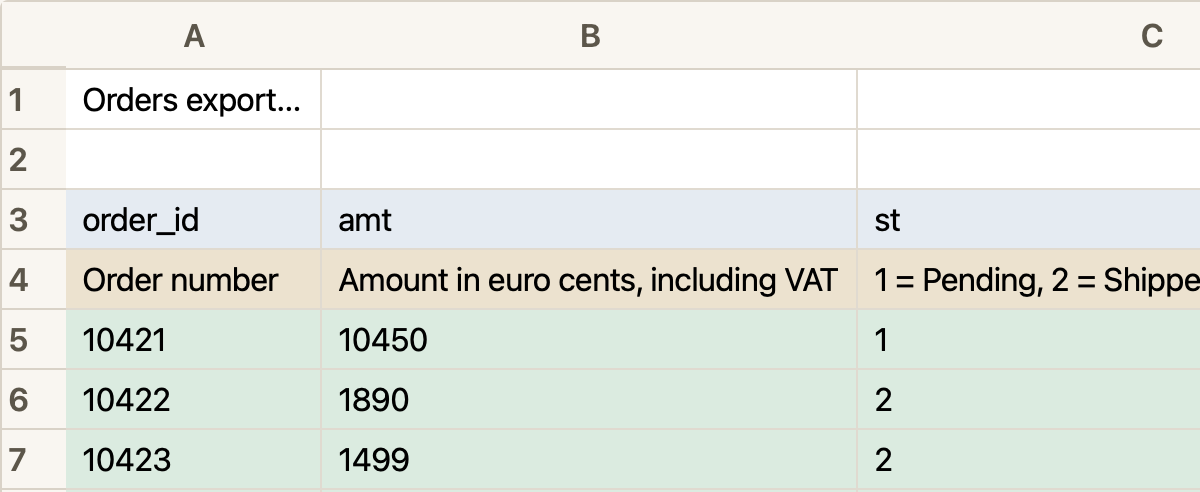
You can load several files. Totsum looks for the columns that link them, such as a customer number that appears in two tables, so that one question can use both.
How to phrase a question
Ask the way you would ask a colleague who has the file open.
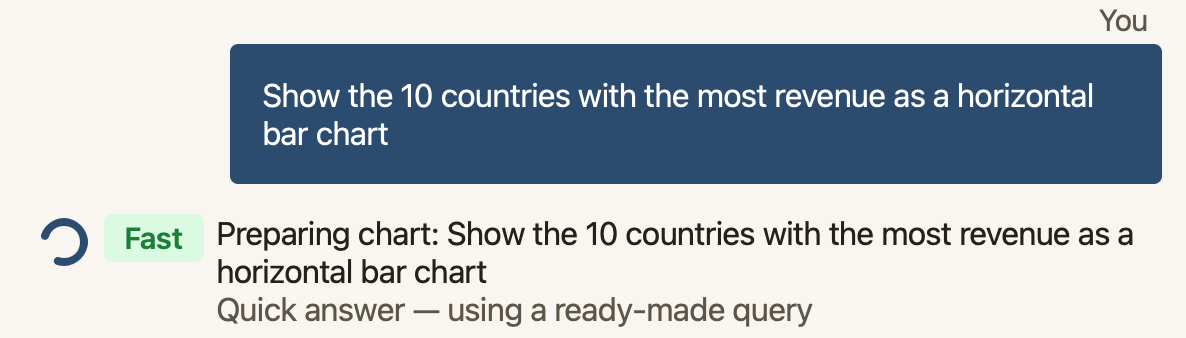
Say what you want to see. “Show the 10 countries with the most revenue as a horizontal bar chart” gets that chart, ranked. “What’s the total revenue?” gets a single figure. “Show me the orders from Belgium” gets the rows themselves, as a table you can sort.
Name the column when a word could mean two things. If the file has an order date and a delivery date, “sales in March” leaves the AI to guess which one you mean. “Sales by order date, March 2026” tells it which date to use.
Refine with a follow-up. The assistant remembers the conversation, so “Only 2024”, “Make it a pie chart” or “Split it by region” applies to the last result.
Answer its questions. When a question can be read in more than one way, the assistant asks which reading you meant, often as a numbered list. Reply with the number.
Describe what the column names hide. A column called amt may hold cents, and a st of 3 may
mean that the order was canceled. The AI reads the column names, their types and a few sample
values, so a short description of such a column changes the answers.
How to add descriptions to a dataset shows how to
give them.
If you do not know where to start, the assistant proposes a few opening questions after a file has loaded, written from what it saw in your data. When none are shown, the Suggest some questions button asks for some.
How long an answer takes
While the assistant works, a small chip next to the progress line says which kind of answer is coming. Fast means the question matched a ready-made query and is answered at once. Deep means the AI is reasoning through the question and writing its own query. You can switch to something else while it works, and the answer waits in the chat. On most machines, a deep answer is a matter of minutes, not seconds.
How to check an answer
An answer can be wrong, so each result carries what you need to check it, on the tabs of its preview:
- Data shows the rows behind the result. If a figure looks too high, the rows show what was counted.
- Statistics gives the figures that the written answer was built from, with any caveat about the data.
- Query Flow retells the query in plain language, step by step, with the table it reads, its filters and its grouping. It shows whether “sales in March” was read by order date or by delivery date. When a query is too complex for Totsum to check its retelling, the tab says so, and the SQL tab has the query.
- SQL shows the query itself, which you can edit and run again.
Two habits help you find the mistakes that you can see yourself. Before you use a figure, open the rows behind it and read the steps that produced it. And ask the same thing a second way, for example “total revenue in 2025” and then “revenue by month in 2025”. If the two disagree, at least one of the queries is wrong, and the steps or the SQL can show which one.
Who reviews the answer
Those two habits are a first filter. Before you use a figure in a decision, a report or a message to a client, a person who knows the subject must check it. Totsum says so before the first question, and the rule holds for every answer after it.
That person does not have to be an analyst. They need to know the business behind the numbers. Often the simplest check is to ask the person closest to the figure. If the answer says that sales in Spain fell last quarter, the sales manager in charge of Spain can tell you whether that matches what they saw. For a payroll figure, ask the person who runs the payroll; for a cost, the accountant.
In Totsum, you shortlist the results you want checked, and a follow-up report carries each one to your reviewer, with its question, its chart and its query, your note, and a place for their verdict.
When the file belongs to a client
Whether a client’s file may go to an online service depends on your contract with the client. A contract that forbids uploading the file to a cloud AI may still allow an AI that runs on your own machine.
Totsum Data Explorer is in a private beta, free in its first phase. You can apply for the beta; the free trial opens after it.